


Same-day, just-in-time advising appointments for current College of Science and Engineering majors.
Appointments offered on select dates.
Important: Fill out the free text box
Important: Fill out the free text box
Meetings last a maximum of 30 minutes. To best utilize your time, type your reason for making an appointment.
Examples: “I want to plan courses for next semester," or “I'm thinking about dropping MATH 2417 - how will that affect my plans for next semester?” or “I want to change my minor.”
-
Upcoming events
-
When are same-day appointments available?
Starting June 1, 2026:
Same-day advising is typically available on weekdays during the day, though availability may vary based on advisor schedules and university events.
New same-day appointments are released each morning between 8:00–8:15 a.m. in NavigateTXST. After this time, available appointments will appear until all slots are filled. -
When will same-day appointments show in NavigateTXST?
Same-day appointments are released each morning by 8:15 am in NavigateTXST.
- Because availability is released manually each morning, appointments will not be visible before approximately 8:15 am.
- After that time, available appointment times will appear until all slots are filled or advising ends for the day.
Same-day advising appointments will appear in NavigateTXST if all of the following are true:
- Same-day advising is offered that day
- It is after 8:15 a.m.
- Appointment slots are still available
- The appointment does not conflict with your class schedule
If these conditions are not met, no appointment times will appear. -
Why can't I see any same-day appointment availability?
Same-day appointments are released manually by advisors each morning, so they will not appear in NavigateTXST until approximately 8:00–8:15 a.m. on the day advising is offered.
If you check before this time, no appointments will be visible.
If you check after 8:15 a.m. and still do not see any appointments, it likely means advising is not offered that day, all slots have already been filled, or the available times conflict with your class schedule.
-
-
How do Same-Day Advising Appointments work?
-
What are Same-Day Advising Appointments?
Same-day advising appointments are a way to connect with a COSE Advisor for just-in-time recommendations and referrals. Most appointments take place via Zoom, but some in-person appointments are available.
-
How long are Same-Day Advising appointments?
Meetings last a maximum of 30 minutes.
-
Who can attend same-day advising?
Same-day advising is for current undergraduate students assigned to the College of Science and Engineering Advising Center.
Same-day advising appointments are designed for students who have questions about the current semester or need help planning their schedule for the upcoming semester.
Same-day advising appointments are not designed for long-range planning or Satisfactory Academic Progress plans.
The following student types will be allowed to reserve a same-day advising appointment:
- Current students.
- Readmitted and transfer students who do NOT have an advising hold (aka have been advised).
If you are an incoming First Year Student, you will receive advising as part of your New Bobcat Enrollment and Orientation experience.
-
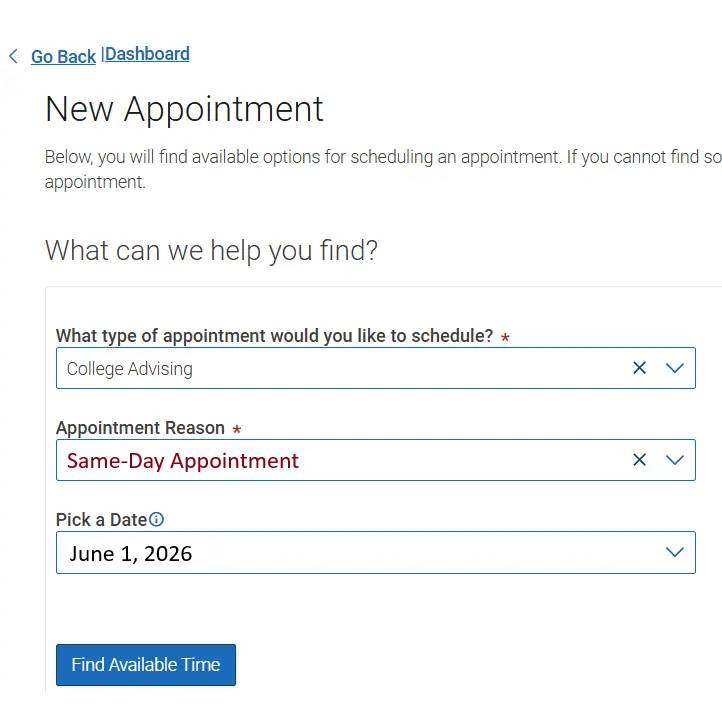
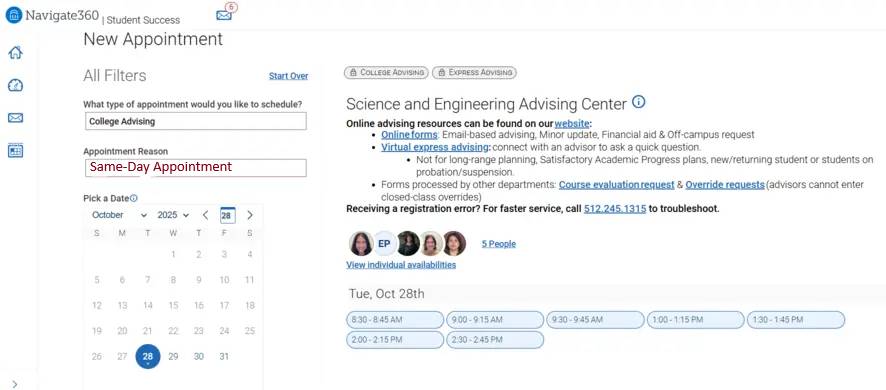
How do I schedule a same-day, just-in-time appointment?
- Log in to the NavigateTXST app or website around 8:15 am.
- Click on the “Appointments” section.
- Choose “Schedule Appointment.”
- Make the following selections:
- Type of appointment: Academic Advising,
- Service: Same-Day Appointment.
- Find Available Time
- Select an appointment time.
- Appointment times will be booked quickly during certain times of the semester.
- If no appointment times are displayed, all appointment slots are booked.
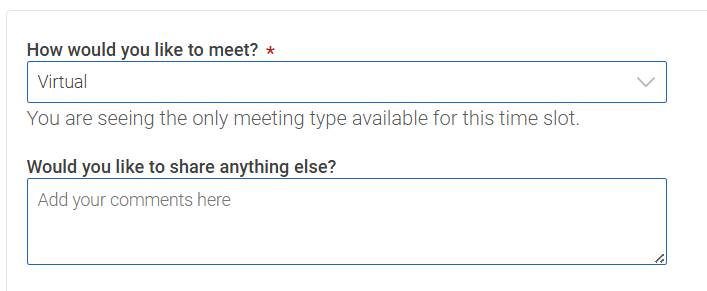
- To best utilize your time, complete the “Would you like to share anything else?” text box. This is where you let the advisor know what you need help with and your goals for the meeting.
- Press “Schedule.”
- Check your email to access your advisor's Zoom link or physical location.
- Join the Zoom link at least 2 minutes before your appointment time.
Additional information about how to schedule an appointment can be found on the NavigateTXST website.
Photo examples:
-
What video conferencing software is used?
Zoom is used to meet with most students. Your advisor's Zoom link will be included in the appointment confirmation. Log in at least 2 minutes before your appointment is set to begin.
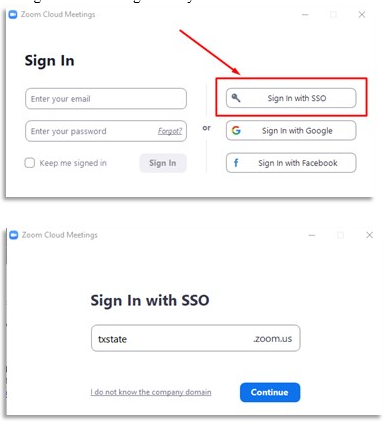
Download the Zoom application and confirm that you are able to log in using your Texas State NetID and password. Students have access to Zoom Pro with their Texas State credentials.
Check that your webcam and microphone work. If you use wireless headphones/earbuds, please put them on prior to joining the meeting. Attending the meeting via cell phone is not ideal, but acceptable. We will not meet with students who are operating a motor vehicle.
-
How can I prepare for my Same-Day Advising session?
- Know what you want to discuss—focus on 1–3 key questions.
- Prioritize your topics; we may not have time to cover everything.
- Review your degree audit to confirm your major, minor, and concentration.
- Join the Zoom link at least 2 minutes early to get settled.
-