

Congratulations!
You just received your initial new and returning student advising. We are glad to have another Bobcat join us next semester!
The COSE Advising Center is here to help you get answers to your most common questions and concerns as you prepare for the upcoming semester. Keep reading to learn about your next steps and how to connect with an advisor via Zoom for any follow-up questions you might have!
-
Your next steps
-
1. Resolve any remaining holds
To check if you have any holds that will prevent registration, click on the "Registration" link in Self-Service Banner. Then, press "Registration Status" (View Holds and Time Tickets).
View a list of hold codes, what they mean, and who to contact regarding the hold.
-
2. Adjust your schedule
If the plan you were sent from an advisor differs from any registrations you already made for the upcoming semester(s), consider adjusting your registrations to match the advisor's recommendations.
If you are not sure if you should update your registrations, please reply to the email and inquire with your advisor.
-
3. Send transcripts
If you are currently enrolled in courses at another university (or recently completed courses at another university), we need your final official transcript for that credit to show up in the TXST system.
Send official copies of your transcript(s) to:
- Office of Undergraduate Admissions, 429 N. Guadalupe Street, San Marcos, TX 78666
or - If possible, request that transcripts are sent electronically.
- Office of Undergraduate Admissions, 429 N. Guadalupe Street, San Marcos, TX 78666
-
4. Ask follow-up questions
If your question is fairly simple:
- reply directly to the email that was sent to you from an advisor. Be as specific as possible with your questions.
If your question is more involved or requires a conversation:
- join us at an upcoming NSO Advising Follow-Up session (Zoom-based; more info below)
-
5. Submit override requests
Your advisor may have told you that you will need to "late register" for a TXST course. This is because you are enrolled in the prerequisite off-campus.
Once you successfully complete the prerequisite off-campus, submit an override request to the department that offers the course. Be prepared to attach a screenshot of your final grades off-campus. If the department approves of your override request, they will reply to your TXST email and inform you that you are eligible to register for the course (provided space is available).
The College of Science and Engineering does not reserve seats for future courses you want to register for.
-
New & Returning Student Advising: Real-Time Follow-Up Sessions via Zoom
General Information
New & returning student follow-up sessions are a way to connect with a COSE Advisor without a scheduled appointment regarding your course recommendations and questions about your TXST degree.
Virtual NSO follow-up advising session schedule: advising takes place on select dates.
- We will stop adding students to the queue at approximately 30 minutes prior to the end of the event.
- Sessions are typically 15 minutes (times will vary depending on student questions and assistance needed).
- We recommend joining the queue as soon as the form link is live.
Follow-up sessions are not designed for long-range planning, graduation estimates, and/or Satisfactory Academic Progress plans.
How do NSO advising follow-up sessions work?
- When you click the link to join the queue, you will be asked to register for a follow-up session. The link will go live at 8:15 am. This allows our team to gather some of your information prior to talking with you.
- Once you register, a COSE Advising staff member will add you the student to the advising queue.
- Advisors will connect with students in the order they were added to the queue. When you are the next student in the queue, you will receive an email invitation to join the advisor's Zoom room.
- There will be a wait to meet with an advisor.
- Wait times vary greatly depending on the following factors: proximity to registration opening for the upcoming semester, the number of advisors available, the functionality of advising software, the complexity of student questions, and more.
- Students have experienced wait times between 10 minutes - 1.25 hours.
- You will have five minutes from the time the email is sent to click the link and join the room. If you do not join within five minutes, the advisor will move on to the next student and you will be off the queue.
- If you miss your link, you need to fill out this registration form again to be added back to the queue.
- COSE Advising will close the registration form when the queue is full. This is so COSE Advisors can meet with all students who are in the NSO Advising Follow-up session queue prior to the event ending. For this reason, we recommend registering for a follow-up advising session as soon as the registration form opens.
To best utilize your time, please:
- Ensure you have read ALL of your advising notes placed in NavigateTXST.
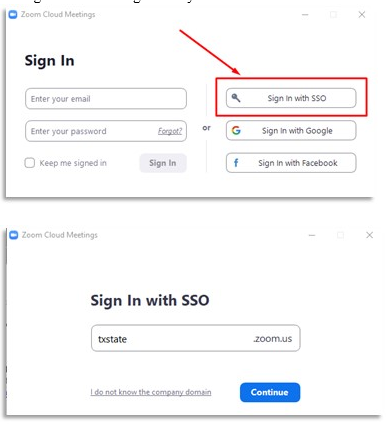
- Download the Zoom application and confirm that you are able to log in using your Texas State NetID and password. Students have access to Zoom Pro with their Texas State credentials.
- Check that your webcam and microphone work. If you use wireless headphones/earbuds, please put them on prior to joining the meeting. Attending the meeting via cell phone is not ideal, but acceptable. We will not meet with students who are operating a motor vehicle.
- Ensure you can access your Texas State email, called Bobcat Mail.
- Prepare questions that you might have. Advisors love when students have a list of questions prepared for their appointments!